
Little Scholars
Tutor Programs
TUTOR PROGRESS TRACKER APP
Know what every student needs next.
Record a lesson in under a minute. The Tracker tells you whether to move on, review or repeat, and writes the parent update for you.
- Included with every level, for all your students
- Works on phone, tablet or computer
- Student records stay on your own device
HOW IT WORKS
Three steps after every lesson
1
Add your student
Enter their name and level. Add their Progress Test 1 score and the Tracker shows where they should start.
2
Record the lesson
Enter their accuracy, how fluent they were on the timed page, and how they handled problem solving.
3
Follow the advice
Move on, move on and review, or repeat. Then copy a ready-made update for the parents.
CLEAR ADVICE
No more guessing whether a child is ready
The same simple rules at every level, so every student gets fair, consistent decisions.
Record Lesson 5 • Mei Lin
Accuracy
88%
Fluency (timed page)
Fluent
Developing
Needs support
Problem solving
Independent
With hints
Not yet
✓ Move on to Lesson 6
Accuracy 85% or above, fluency and problem solving on track
Move on
Accuracy 85% or above, fluent or developing, solving problems on their own or with hints
Move on + review
Accuracy 70-84%, or fluency needs support, or problem solving not yet there
Repeat
Accuracy below 70%: teach the lesson again before moving on
PROGRESS TESTS
Test scores turned into next steps
Enter each progress test score and the Tracker shows the band, plus what to do next.
Placement: a strong score on Progress Test 1 lets a new student skip ahead to Lesson 4. The Tracker marks the skipped lessons for you.
Excellent
36-40
Strong
32-35
Building confidence: review
26-31
More practice: revisit and
retake
0-25
THE 35-WEEK JOURNEY
See every student's year at a glance
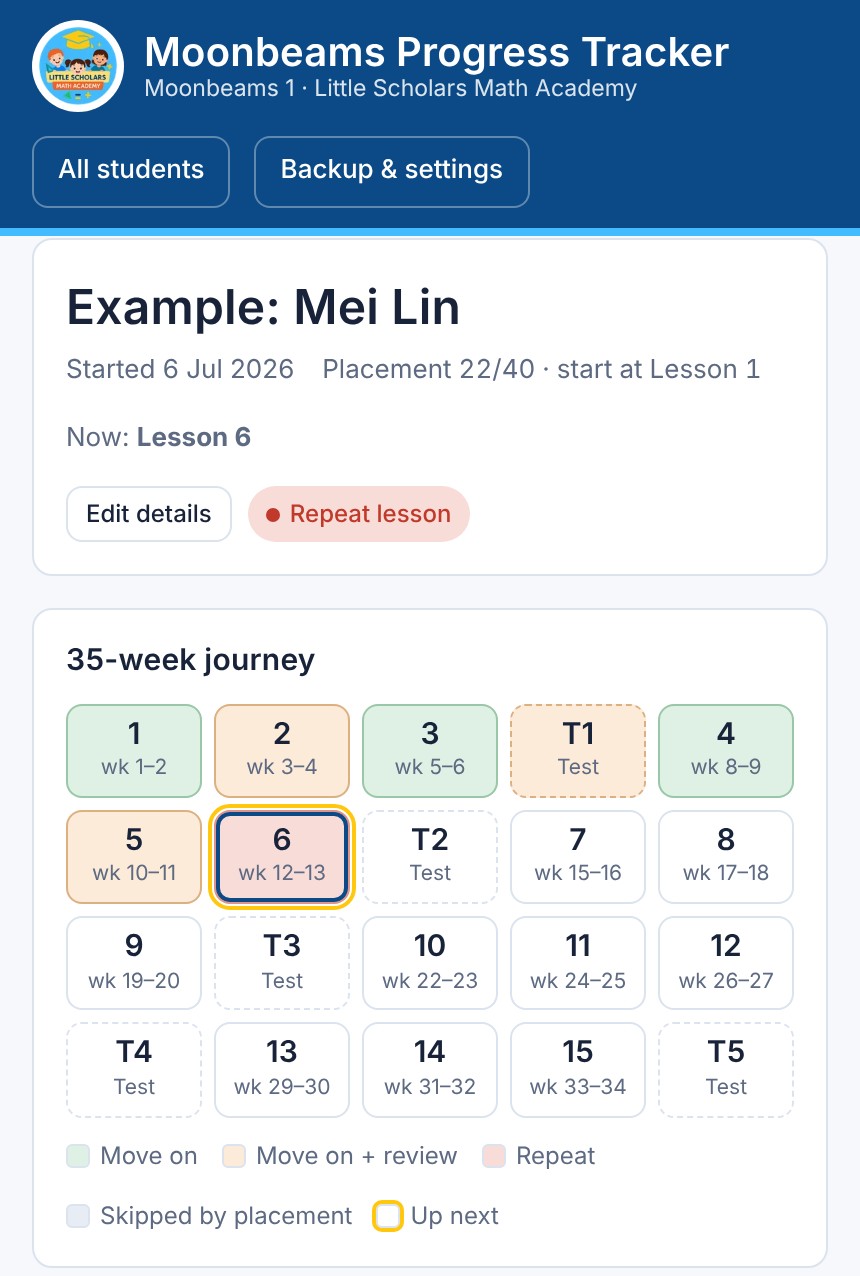
Each lesson and test is colour-coded, so you can spot who is racing ahead and who needs more time.
Move on
Move on + review
Repeat
Skipped by placement
Up next
PARENT UPDATES
Keep parents happy in seconds
After each lesson, the Tracker writes a short update with what their child did and what comes next. Tap Copy message and paste it into WhatsApp, email or text.
Regular updates show parents the progress they're paying for, which keeps students enrolled.
Example parent update
Hi! Here's Mei Lin's update for this week.
She finished Lesson 5 of Moonbeams 1 with 88% accuracy. Her timed page is getting faster, and she solved most word problems with a small hint.
Next week: Lesson 6, multiplying 2-digit numbers.
Practice at home: 5 minutes of times tables each day.
PRIVATE BY DESIGN
Your students' records stay with you
Stored on your device
Records are saved in your own browser, not on our servers.
Easy backups
Go to Backup and settings, then Download backup file. Keep it somewhere safe.
Moves up with them
When a student finishes a level, move them up and keep tracking in the same app.
QUESTIONS
Tracker app FAQ
Does the Tracker cost extra?
No. It's included with every level you buy, and it covers all your students.
Where are my students' records kept?
On your own device. Nothing is stored on our servers. Download a backup file regularly to keep your records safe.
Can I use it on my phone?
Yes. It runs in your web browser on a phone, tablet or computer.
What happens when a student finishes a level?
After Progress Test 5, move them up to the next level and their journey starts again at Lesson 1.
Get the Tracker with any level
Choose your level and start tracking your students today.
© Little Scholars Math Academy • Music Zoo Studio, Singapore
[email protected] • WhatsApp +65 9824 9348